---
url: /en/guide/custom-home/index.md
---
## Overview
The theme provides a highly flexible approach to customizing the homepage. You can tailor your homepage according to your specific requirements.
The theme defines your homepage through `frontmatter`. Write the `frontmatter` in the `README.md` file located in your `sourceDir`.
```md title="README.md"
---
home: true
config:
- type: custom
---
```
The theme follows a flow layout approach to render the homepage, dividing it vertically into distinct,
independent sections, with each section applying a different component.
Multiple sections can be defined via the `config` property using an array structure. The `type` field specifies the type of each section.
The theme includes built-in types such as `banner`, `hero`, `text-image`, `image-text`, `features`, `profile`, and `custom`.
You can freely combine these to assemble your custom homepage.
If none of these meet your needs, you can also write custom components to define your homepage.
## Configuration
### home
* Type: `boolean`
Declares whether this page is the homepage.
### config
* Type: `PlumeHomeConfig[]`
* Default: `[]`
Defines the section content of the page based on the order of the array.
```ts
interface PlumeHomeConfigBase {
/**
* The type of this section, which determines the component applied.
*/
type: 'banner' | 'hero' | 'text-image' | 'image-text' | 'features' | 'profile' | 'custom' | string
/**
* Whether this section should occupy the full viewport height.
*/
full?: boolean
/**
* The background image for this section.
* You can define different images for light and dark modes.
*/
backgroundImage?: string | { light: string, dark: string }
/**
* The background attachment style for this section.
*/
backgroundAttachment?: 'fixed' | 'local'
}
```
## Section Types
### banner
* Type: `PlumeThemeHomeBanner`
A large banner section, suitable for placement at the very top of the homepage.
```ts
interface PlumeThemeHomeBanner extends PlumeHomeConfigBase {
type: 'banner'
/**
* The large background banner image.
*/
banner?: string
/**
* Value range: 0 - 1. Configures the opacity of the mask overlay for the homepage banner image.
* Supports different values for light and dark modes. When set to 0, the mask is not displayed.
* This can be used to darken the image if the first-screen banner is too bright.
*/
bannerMask?: number | { light?: number, dark?: number }
hero?: {
name: string
tagline?: string
text?: string
actions?: {
theme?: 'brand' | 'alt'
text: string
link?: string
}
}
}
```
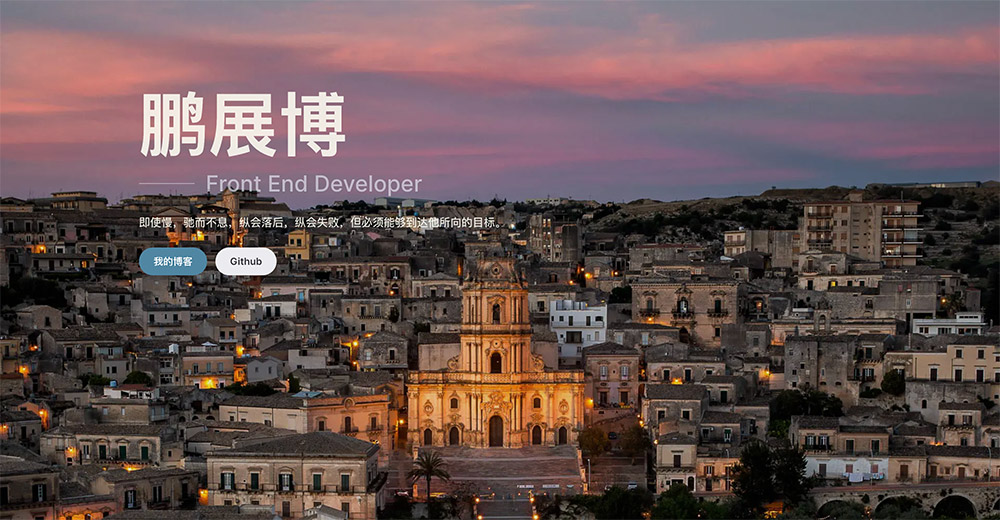
**Example:**
```md
---
home: true
config:
-
type: banner
banner: https://api.pengzhanbo.cn/wallpaper/bing
bannerMask:
light: 0.1
dark: 0.3
hero:
name: Peng Zhanbo
tagline: Front End Developer
text: Even if slow, stop not, even if failed, keep going, but must be able to reach the goal he aims for.
actions:
-
text: My Blog
link: /blog/
theme: brand
-
text: Github
link: https://github.com/pengzhanbo
theme: alt
---
```
**Result:**
:::demo-wrapper img no-padding
:::
### hero
* Type: `PlumeThemeHomeHero`
Suitable for documentation-type sites, placed at the top.
```ts
interface PlumeThemeHomeHero extends PlumeHomeConfigBase {
type: 'hero'
hero: {
name: string
tagline?: string
text?: string
actions?: {
theme?: 'brand' | 'alt' | 'sponsor'
text: string
link?: string
icon?: string // Icon to the left of the text
suffixIcon?: string // Icon to the right of the text
target?: '_blank' | '_self' | string
rel?: string
}
}
/**
* The built-in background effects of the theme, if they are not preset background effects, allow for a background image link address to be passed in.
*/
effect?: 'tint-plate' | 'prism' | 'pixel-blast' | 'hyper-speed' | 'liquid-ether'
| 'dot-grid' | 'iridescence' | 'orb' | 'beams' | 'lightning' | string
/**
* Background effect configuration options vary depending on the value of `effect`.
*/
effectConfig?: any
/**
* If using a non-preset background, set the filter effect for the background image.
*/
filter?: string
}
```
[See **Background Effects Configuration & Demo** to learn more.](./home-hero-effect.md){.read-more}
The theme also supports customizing the colors of `name`, `tagline`, and `text`.
Configure this via CSS Variables.
```css
/* Default settings, can be overridden in `index.css` */
:root {
/* home hero name background color. The text color is defined via background clipping,
allowing gradient backgrounds for more expressive text. */
--vp-bg-home-hero-name: linear-gradient(315deg, var(--vp-c-purple-1) 15%, var(--vp-c-brand-2) 65%, var(--vp-c-brand-2) 100%);
--vp-c-home-hero-tagline: var(--vp-c-text-2);
--vp-c-home-hero-text: var(--vp-c-text-3);
}
```
### doc-hero
* Type: `PlumeThemeHomeDocHero`
Suitable for documentation-type sites, placed at the top.
```ts
interface PlumeThemeHomeDocHero {
type: 'doc-hero'
hero: {
name: string
tagline?: string
text?: string
image?: string
| { src: string, alt?: string }
| { dark: string, light: string, alt?: string }
actions?: {
theme?: 'brand' | 'alt' | 'sponsor'
text: string
link?: string
icon?: string // Icon to the left of the text
suffixIcon?: string // Icon to the right of the text
target?: '_blank' | '_self' | string
rel?: string
}
}
}
```
**Example:**
```md
---
home: true
config:
-
type: doc-hero
hero:
name: Theme Plume
text: VuePress Next Theme
tagline: A minimalistic, easy-to-use, feature-rich vuepress documentation & blog theme
image: /plume.png
actions:
-
theme: brand
text: Get Started →
link: /guide/intro/
-
theme: alt
text: Github
link: https://github.com/pengzhanbo/vuepress-theme-plume
---
```
**Result:**
:::demo-wrapper img no-padding
:::
The theme also supports customizing the colors of `name`, `tagline`, `text`, and the background color of the `image`.
Configure this via CSS Variables.
```css
/* Default settings, can be overridden in `index.css` */
:root {
--vp-home-hero-name-color: transparent;
--vp-home-hero-name-background: linear-gradient(120deg, var(--vp-c-purple-1) 30%, var(--vp-c-brand-2));
--vp-home-hero-tagline: var(--vp-c-text-2);
--vp-home-hero-text: var(--vp-c-text-1);
--vp-home-hero-image-background-image: linear-gradient(-45deg, var(--vp-c-brand-soft) 50%, var(--vp-c-brand-2) 50%);
--vp-home-hero-image-filter: blur(44px);
}
```
### features
* Type: `PlumeThemeHomeFeatures`
Suitable for displaying features, functionalities, etc.
```ts
interface PlumeThemeHomeFeatures extends PlumeHomeConfigBase {
type: 'features'
title?: string
description?: string
features: PlumeThemeHomeFeature[]
}
interface PlumeThemeHomeFeature {
/**
* Icon, also supports passing an iconify icon name.
*/
icon?: FeatureIcon
title: string
details?: string
link?: string
linkText?: string
rel?: string
target?: string
}
type FeatureIcon = string | {
src: string
alt?: string
width?: string
height?: string
wrap?: boolean
} | {
light: string
dark: string
alt?: string
width?: string
height?: string
wrap?: boolean
}
```
**Example:**
```md
---
home: true
config:
-
type: features
features:
-
title: Responsive Layout
icon: 💻
details: Adapts to mobile devices, PCs, and tablets.
-
title: Blog & Documentation
icon: 📖
details: Whether you want to write a blog, product documentation, or both.
-
title: Out of the Box
icon: 🚀
details: Supports zero-configuration usage, along with rich customization options.
-
title: Multi-language
icon: ⚖
details: Built-in support for Chinese/English, with the ability to add more languages.
-
title: Dual Theme
icon: 👨💻
details: Supports light/dark themes, including code highlighting.
-
title: Plugins
icon: 📦
details: Rich built-in plugins to handle common website needs in one place.
-
title: Search, Comments
icon: 🔍
details: Supports multiple comment systems, local search, and Algolia search.
-
title: Encryption
icon: 🔒
details: Supports full-site encryption, partial encryption (encrypted directories, encrypted articles).
-
title: Markdown Enhancements
icon: 📝
details: Supports Markdown syntax, code block groups, hint containers, task lists, mathematical formulas, code demos, etc.
---
```
**Result:**
:::demo-wrapper img no-padding
:::
### text-image | image-text
* Type: `PlumeThemeHomeTextImage`
Left-right layout for text and image.
```ts
interface PlumeThemeHomeTextImage extends PlumeHomeConfigBase {
type: 'text-image' | 'image-text'
image: PlumeThemeImage
width?: number | string
title?: string
description?: string
list: (string | { title?: string, description?: string })[]
}
type PlumeThemeImage
= | string
| { src: string, alt?: string }
| { dark: string, light: string, alt?: string }
```
**Example:**
```md
---
home: true
config:
-
type: image-text
title: Features
description: Rich built-in features to meet general website requirements.
image: /images/plume-1.svg
list:
-
title: Article Information
description: Add tags, categories, word count, reading time, writing date, and other information to articles.
-
title: Comments
description: Support for 4 comment systems, allowing you to freely choose the one that fits your needs.
-
title: Search
description: Supports minisearch-based local search and Algolia search.
-
title: Encryption
description: Supports full-site encryption and partial encryption (encrypted directories, encrypted articles).
-
title: Code Copy
description: One-click copying of code block content.
-
type: text-image
title: Blog
description: The theme natively supports blogging, generating your personal blog.
image: /images/plume-2.svg
list:
-
title: Article List
description: Automatically sorts and generates blog article list pages based on writing dates.
-
title: Author Information
description: Customize name, motto, avatar, and social media links.
-
title: Tags, Archive
description: Automatically generates tag pages and archives articles by year.
---
```
**Result:**
:::demo-wrapper img no-padding
:::
:::demo-wrapper img no-padding
:::
### posts
Inserts a post collection article list page as a separate section into the homepage.
```ts
interface PlumeThemeHomePosts extends PlumeHomeConfigBase {
type: 'posts'
collection?: string
}
```
When multiple post collections exist, it reads the article list from the first collection by default.
You can specify which collection's article list to read using the `collection` configuration option.
The value of `collection` should match the `dir` value of the collection.
**Example:**
```md
---
home: true
config:
-
type: posts
collection: blog
---
```
### profile
* Type: `PlumeThemeHomeProfile`
Displays personal information.
```ts
interface PlumeThemeHomeProfile extends PlumeHomeConfigBase {
type: 'profile'
name?: string
description?: string
avatar?: PlumeThemeImage
circle?: boolean
}
type PlumeThemeImage
= | string
| { src: string, alt?: string }
| { dark: string, light: string, alt?: string }
```
**Example:**
```md
---
home: true
config:
-
type: profile
name: pengzhanbo
description: Even if slow, stop not, even if failed, keep going, but must be able to reach the goal he aims for.
avatar: /images/avatar.png
---
```
**Result:**
:::demo-wrapper img no-padding
:::
### custom
* Type: `PlumeThemeHomeCustom`
Custom content. The markdown content written in the `README.md` file will be inserted into the corresponding section.
```ts
interface PlumeThemeHomeCustom extends PlumeHomeConfigBase {
type: 'custom'
}
```
**Example:**
````md
---
home: true
config:
-
type: custom
---
### Installation
:::code-tabs
@tab pnpm
```sh
pnpm add vuepress@next vuepress-theme-plume vue
```
@tab npm
```sh
npm install vuepress@next vuepress-theme-plume
```
@tab yarn
```sh
yarn add vuepress@next vuepress-theme-plume
```
:::
````
**Result:**
:::demo-wrapper img no-padding
:::
## Custom Section Types
When the built-in section types are insufficient for your needs, you can create custom section types.
Each custom section type is essentially a component.
A simple example is as follows:
::: code-tabs
@tab your-component.vue
```vue
...
```
:::
Add the component in the `enhance` hook within `.vuepress/client.ts`
::: code-tabs
@tab .vuepress/client.ts
```ts
import { defineClientConfig } from 'vuepress/client'
import YourComponent from 'your-component.vue'
export default defineClientConfig({
enhance({ app }) {
app.component('your-component', YourComponent)
},
})
```
:::
Then, you can use `your-component` in your `README.md`.
```md
---
home: true
config:
-
type: 'your-component'
# ...
---
```